Withdraw Your Kaya Chat Diamonds
Ready to withdraw your earnings? Check the minimum amount, review the available payout methods, and follow the steps in your Kaya Chat account
What to Know Before You Withdraw
Before submitting a withdrawal request, make sure your available diamonds meet the minimum amount and that you can provide the payout details required for your selected method.
| Requirement | Details |
|---|---|
| Minimum withdrawal | $10, equivalent to 100,000 diamonds |
| Withdrawal frequency | Daily |
| Available payout methods and systems | Epay, Binance, USDT, and the payroll system |
| Expected processing time | Within 24 hours on working days |
How to Withdraw from Kaya Chat
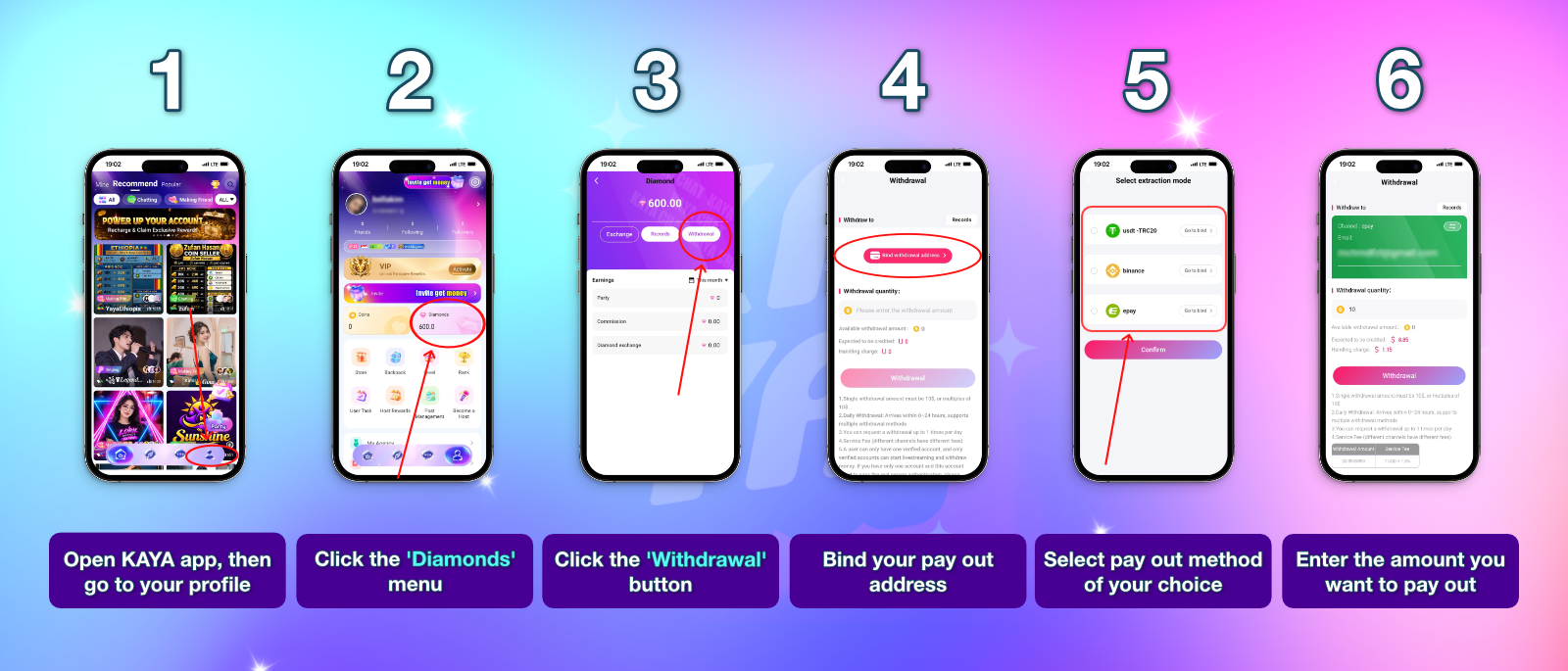
Open Kaya Chat and go to your Profile page.
Tap the “Diamonds” menu.
Tap “Withdrawal.”
Bind your “Pay Out Address” by entering the payout details required for your chosen method.
Select a payout method from the options available in your account.
Enter the amount you want to withdraw, making sure it meets the $10 minimum (100,000 diamonds).
Review the payout details and follow any additional instructions shown in the app to complete your request.
Frequently Asked Questions
The minimum withdrawal is $10, equivalent to 100,000 diamonds.
Yes. Withdrawals are listed as available daily, as long as you meet the applicable withdrawal requirements.
The listed payout methods and systems are Epay, Binance, USDT, and the payroll system. The options shown in your account determine which method you can select.
